Back to Blog



Monica Jansen
Jul 9, 2026
What Is a Firewall? Everything You Need to Know
With the cyber world advancing at record speed, employing sturdy and reliable protections when surfing the internet is a must for individuals and businesses alike.
As a first line of defense, firewalls should be everyone’s priority. Without them, we are easy targets for all attackers, hackers, and anyone else looking to exploit network vulnerabilities.
But what exactly is a firewall? Do you really need it? And how can you make sure it’s at its strongest?
- What Is a Firewall?
- How Does a Firewall Work, Really?
- What Are the Benefits of Having a Firewall?
- What Types of Firewalls Are There?
- Do You Need a Firewall?
- Tried and True Firewall Tips
Read on as we answer all these questions—and a slew of others—and teach you all you need to know!
What Is a Firewall?
You can look at a firewall as your digital security system. Its purpose is to monitor all incoming and outgoing traffic and mitigate any attacks or malicious requests.
It does so by differentiating between safe and potentially dangerous communications and only letting the former through.
To do all this, a firewall adheres to a set of rules established by you, your network administrator, or anyone else supplying your firewall.
Common Use Cases
Typically, individuals use software firewalls. They come installed on most Windows and Mac computers, and they protect them from all malicious activity.
In the case of larger businesses, hardware firewalls are also a popular choice. As their name suggests, these firewalls are tangible and are typically installed on network routers.
Therefore, companies usually employ both software and hardware firewalls, ensuring that all their communications go through at least two defense systems.
How Does a Firewall Work, Really?
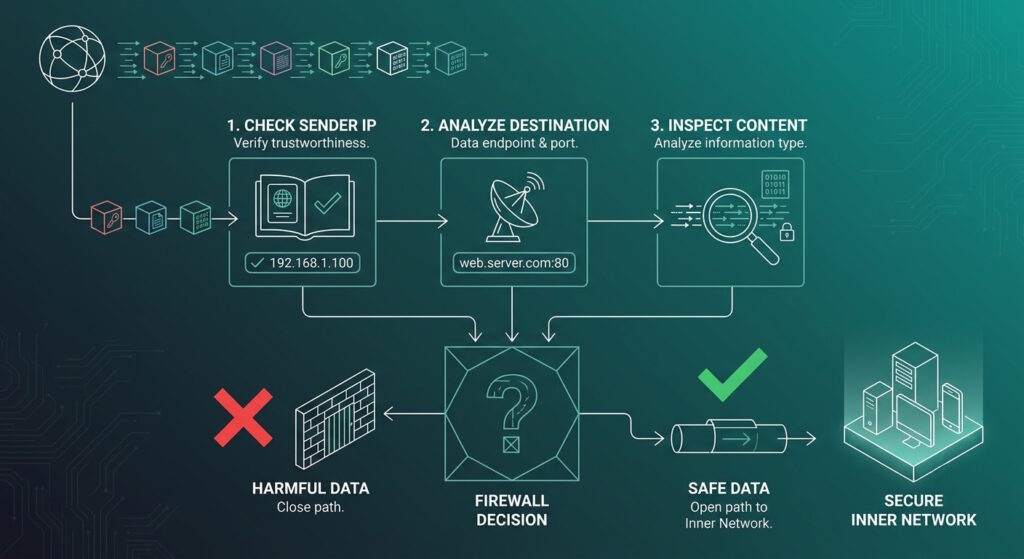
Put simply, a firewall filters all the connection requests and data (also called packets) entering your system.
First, it checks the sender’s IP address and verifies that it is trustworthy. Then, it analyzes the data’s destination, as well as what the information itself contains.
By being thorough and combining information from these three points, a firewall can decide whether something is safe or harmful. At that point, it opens (or closes) the network pathways accordingly.
Now, you’re probably wondering how a firewall knows the difference between malicious and non-malicious requests. If so, that’s a great question.
Specific Guidelines
Firewalls are, of course, non-sentient. As such, they require humans to outline a clear set of security rules that they then follow.
So, a firewall works based on a clear-cut set of guidelines that determine what type of data can enter a network. In these rules, it is plainly stated what constitutes malware, and such content is automatically blocked.
That’s why (and how) you receive those warning notifications when you try to enter shady websites. It’s just your firewall notifying you of potential dangers.
What Are the Benefits of Having a Firewall?
As we have already mentioned, firewalls are important in business and consumer settings alike.
The only difference is that corporate firewalls are usually sturdier and consist of several layers, while consumer options are simpler.
Still, they serve the same purpose, which is protecting a computer (or an entire network of them) from malware. This includes but is not limited to:
- Defense against threats: External hacking attempts or any internal malicious activity.
- Traffic filtering: Ensures that only non-malicious data from the internet is allowed inside a network.
- Controlling access: Limiting or blocking access to certain websites that might be harmful to the device or network.
- Secure remote access: Often involves a virtual private network (VPN) and allows private and safe remote connections.
- Network segmentation: Separates a network into security zones, giving more security to sensitive systems and data.
What Types of Firewalls Are There?
Firewalls can be classified in two main ways—by the type of system they protect or by the method they use to filter traffic.
In terms of what they protect, there are:
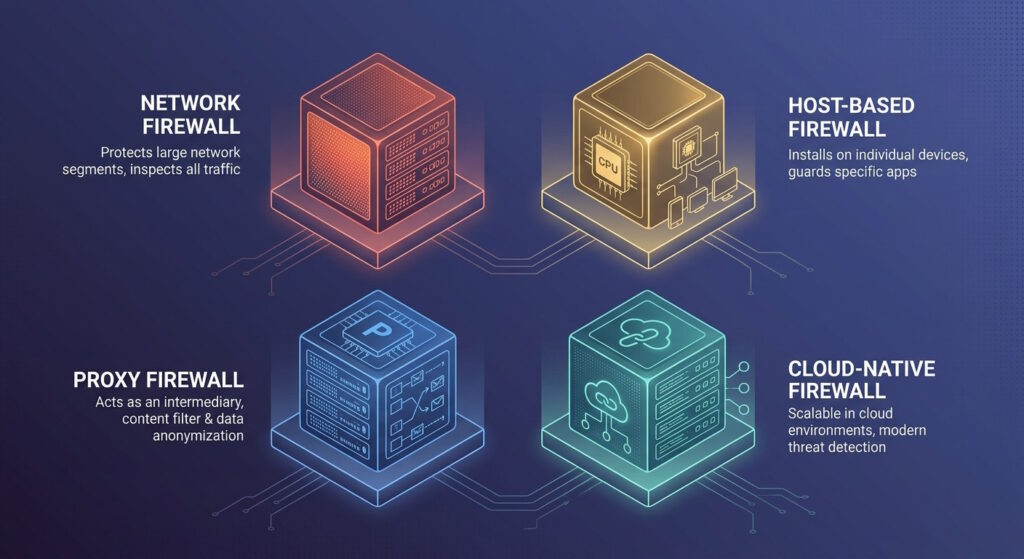
- Network firewalls: Safeguard entire networks and are typically implemented as hardware devices.
- Host-based firewalls: Protect individual machines (or “hosts”) and are usually deployed as software.
When it comes to the method of protection used, firewalls can be:
- Packet-filtering firewalls: Analyze packets (data) individually, without considering their context within a session.
- Stateful inspection firewalls: Track the state of network connections, ensuring that packets are part of a valid, established exchange.
- Circuit-level gateways: Focus on monitoring the TCP handshake process, verifying trust between clients and servers before allowing communication.
- Proxy firewalls (application-level gateways): Operate at the application layer of the OSI model, inspecting traffic with greater depth.
- Next-generation firewalls (NGFWs): Combine traditional firewall functions with intrusion prevention and application control for more layered security.
- Threat-focused NGFWs: Extend NGFW capabilities by adding advanced threat detection, including defenses against application-layer exploits and malware.
- Virtual firewalls (cloud firewalls): Designed for virtualized environments, providing traffic filtering and monitoring for virtual machines.
- Cloud-native firewalls: which leverage automation and scaling to keep pace with high-speed cloud operations.
- Web application firewalls (WAFs): Specialize in protecting web applications by filtering and monitoring HTTP/HTTPS requests between the app and the internet.
The type of firewall you require largely depends on the level of protection you need. Naturally, individuals will not have the same requirements as, say, large corporations with hundreds of interconnected devices within a network.
That said, Next-Generation Firewalls are recommended as the norm for anyone who takes security seriously and wants to protect themselves as much as possible.
Do You Need a Firewall?
Whether you are simply an internet user or you run a website, having a firewall is an essential requirement.
In today’s day and age, cyber threats are ever-present, and protecting yourself all on your own is impossible.
However, with a firewall, you can rest assured that all the data entering your system—as well as all your connections—are fully safe.
Here is why investing in a sturdy firewall is your best bet:
- All your traffic will be heavily monitored
- You’ll be at an infinitely lower risk of cyber attacks
- Data loss and hacking prevention will be easier
All these benefits are crucial for individuals and companies alike. So, if you are on the fence about whether getting a good firewall is a good idea, heed these words: it’s the best type of protection you can lean on.
Tried and True Firewall Tips
Here are some tips you can use to ensure your firewall is at its strongest and most reliable.
Always Keep It On
Though you might be tempted to turn off your firewall to connect to a specific website or network, it’s best to avoid doing so.
After all, the rules to which your firewall adheres are there for a reason. In case a network or page violates them, it is smart not to visit it at all.
Update Your Software Regularly
Cyber threats evolve every day, so it’s essential to install any and all security updates as soon as they become available.
Otherwise, you risk exposing your device or network to a new type of threat, one that it might not be equipped to handle on its own.
Use a VPN
Adding a VPN to your security lineup is also a good idea.
Namely, it will ensure all your traffic goes through a secure and encrypted tunnel. As such, it will fortify your firewall and act as a second layer of protection, especially against surveillance.
Don’t Accept Suspicious Requests
As we have already mentioned, your firewall works based on strict rules and is able to spot suspicious activity and requests within seconds.
So, try not to accept any connection requests that aim to bypass your firewall’s security.
Instead, block them, investigate the request, and, if necessary, update your firewall permissions to exclude said website. When it comes to this type of security, it is better to be safe than sorry.
Up Your Security
We’ve already touched upon VPNs as great additions to your security packages.
However, there are several other solutions you can (and should) employ to keep your devices and websites safe.
These include malware scanners, anti-virus programs, and encryption tools. Together with your firewall, these types of software protections will ensure you are as safe as possible.
Pick a Reliable Host
If you run a website, choosing a hosting provider that offers you a reliable and impenetrable firewall is also essential.
At Abelohost, we employ a complex firewall reinforced with sturdy intrusion detection and protection systems for our hosting plans.
Thanks to this combination, we safeguard all our clients from attacks, malware, and any other type of cyber threats they might experience.
We also offer personalized protection plans for those who require it, as we always put security first. That’s the type of hosting provider you should opt for.
With such advanced protection, you will always know that your website is in safe hands and that no malicious activity will be able to harm it.
Conclusion
A firewall isn’t just another technical add-on. Rather, it’s the frontline defense that keeps your digital world safe and running smoothly.
From blocking hackers to filtering harmful traffic, it plays a central role in protecting everything you do online.
Whether you’re running a business or simply browsing for fun, having a reliable firewall means you can focus on what matters most without worrying about unseen threats.
In today’s ever-connected world, a strong and reliable firewall is not just recommended—it’s absolutely essential.
Author
Monica Jansen
Monica Jansen is a seasoned tech writer focused on web hosting and cybersecurity. She loves doing deep dives and whittling down difficult topics into simple and succinct concepts. Whether she is covering firewalls or different hosting plans, she always strives to provide clear guides that website owners of all skill levels can follow.
Add your comment
Get content delivered straight to your inbox
Your data.
Your choice.
Work with the best of the best — your projects deserve it.