Back to Blog



Monica Jansen
Oct 1, 2026
DNS Servers Explained: Everything You Need to Know
Many of the online services you use every day rely on DNS servers to connect requests to the right destination.
Each server has a specific role in making that happen.
Depending on its purpose, a DNS server may process a request, guide it to the next server, or provide the needed records.
In this guide, we’ll take a closer look at DNS servers, how they interact, and the types of queries they handle.
- Understanding DNS Servers
- How Do DNS Servers Work?
- Types of DNS Servers
- Types of DNS Queries
- Default vs. Alternative DNS Servers
Understanding DNS Servers
A DNS server is a specialized computer system that handles information related to domain names and their corresponding IP addresses.
Rather than relying on a single central database, DNS distributes the data across servers located around the world.
The information stored on DNS servers goes beyond matching names with IP addresses. It can also contain details related to email delivery, domain verification, and service configuration.
How Do DNS Servers Work?
DNS servers receive queries asking for specific information, such as the IP address associated with a domain.
Finding the answer can involve several server layers, with the request moving between them until the required record is located.
Once the lookup is completed, the response is sent back to the device that made the original request, allowing the connection to continue.
Many DNS servers also cache previous results for a set period of time.
If the same data is requested again, the stored answer can be returned immediately instead of repeating the entire lookup.
Types of DNS Servers
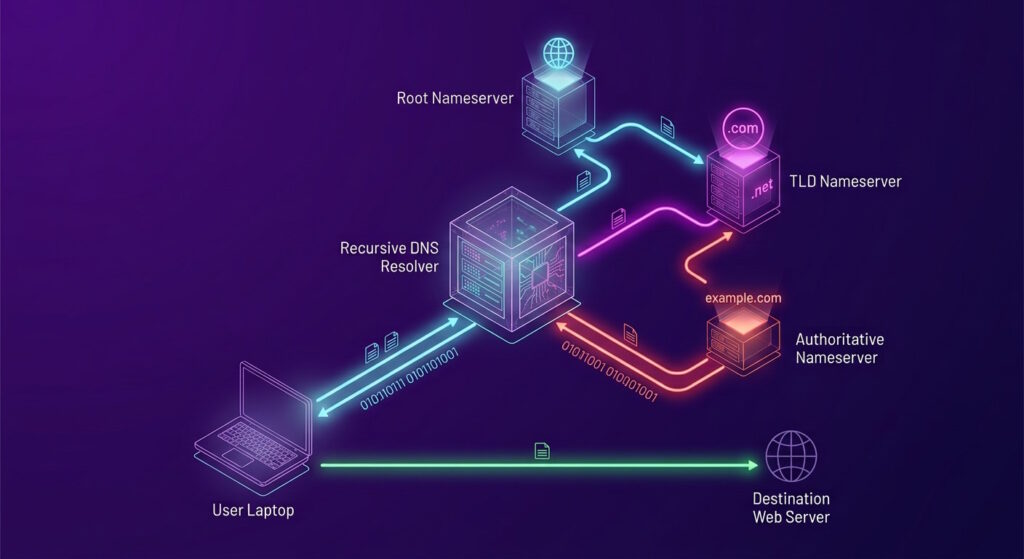
Four main types of DNS servers can be involved in resolving a request:
- Recursive server: receives the initial query and communicates with other servers to obtain the required data.
- Root name server: directs the request to the appropriate TLD server based on the domain extension.
- TLD server: handles extensions such as .com, .org, and .net and identifies the authoritative server for the requested domain.
- Authoritative server: holds the official DNS records and provides the information needed to complete the lookup.
While all four play a part in DNS resolution, recursive and authoritative servers have more distinct responsibilities within the process.
Recursive DNS
A recursive DNS server acts as the main point of contact between your device and the rest of the DNS system.
Most users automatically connect to one provided by their internet service provider (ISP), although public alternatives are also available.
Before performing a full lookup, the recursive resolver checks its cache for a valid stored result. If one is available, it can respond without having to contact other servers.
Otherwise, it follows the DNS hierarchy until it obtains the requested information.
The result is then returned to your device and typically cached for future queries.
Authoritative DNS
The authoritative server sits at the final stage of a DNS lookup and holds the official DNS records for a domain.
When a request reaches it, the server provides the required information, which is returned to the recursive resolver.
Domains typically use more than one authoritative server, which helps keep DNS information available in case one server experiences an issue.
Authoritative servers are also where changes to DNS settings take effect.
For example, if a website moves to a new host, its DNS record can be updated with the new IP address so future requests can reach the right location.
Types of DNS Queries
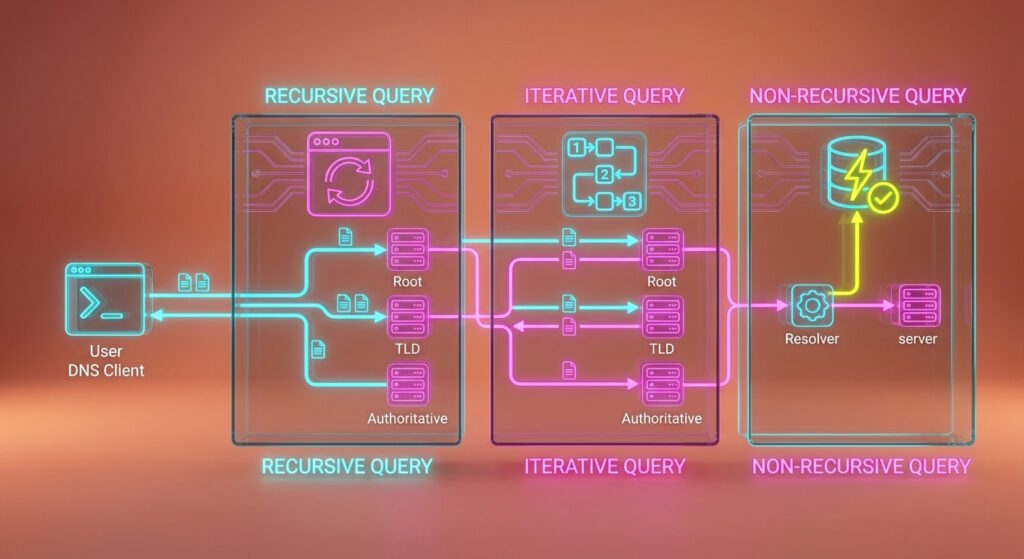
DNS servers use different types of queries to communicate during a lookup. The three main ones are:
- Recursive query: provides a complete answer or an error message if the requested data cannot be found.
- Iterative query: returns the best information available, even if it only helps direct the request further.
- Non-recursive query: retrieves previously stored data, usually from the DNS cache, without needing a new lookup.
The query types describe the kind of response expected between DNS servers.
Which one applies depends on whether a definitive answer is needed, the request needs to continue elsewhere, or the required information is already available.
Default vs. Alternative DNS Servers
Most devices automatically use a DNS server provided through their network connection.
In many cases, this is a resolver operated by your ISP, requiring no additional setup on your side.
For everyday use, the default option is often enough. It handles DNS requests in the background, allowing you to access websites and other services as usual.
However, you can replace it with a public DNS service operated by a third-party provider. Well-known examples include Google Public DNS, Cloudflare DNS, OpenDNS, and Quad9.
The main difference lies in what each provider offers beyond basic name resolution.
Namely, an alternative server may provide faster response times, stronger privacy practices, additional protection against malicious domains, or greater reliability.
Switching servers doesn’t change your internet connection itself—it only changes which resolver handles the domain names you request.
Conclusion
DNS servers rarely attract much attention because most of their work happens out of sight.
Yet, they remain essential to the way we use the internet every day. Knowing what goes into the process makes their importance easier to appreciate.
After all, a system that works almost unnoticed is often the one we rely on the most.
Author
Monica Jansen
Monica Jansen is a seasoned tech writer focused on web hosting and cybersecurity. She loves doing deep dives and whittling down difficult topics into simple and succinct concepts. Whether she is covering firewalls or different hosting plans, she always strives to provide clear guides that website owners of all skill levels can follow.
Add your comment
Get content delivered straight to your inbox



Your data.
Your choice.
Work with the best of the best — your projects deserve it.