Back to Blog





Monica Jansen
Sep 8, 2026
Everything You Need to Know About Website Cookies
You visit a website, and before you even get a chance to look around, a familiar message appears: “We use cookies.”
We’ve all seen it hundreds of times. You may accept them without thinking, reject them whenever possible, or spend time adjusting your preferences.
But what exactly are you agreeing to?
To help you answer that question, let’s take a closer look at what website cookies are, how they work, and what they mean for your online experience and privacy.
- What Are Website Cookies?
- How Do Cookies Work?
- Why Do Websites Use Cookies?
- Types of Website Cookies
- Are Cookies a Privacy Risk?
- What’s Behind Cookie Consent Banners?
- Should You Accept or Reject Cookies?
- How to Manage and Delete Website Cookies
What Are Website Cookies?
Website cookies are small pieces of data that websites save in your browser when you visit them.
Their purpose is simple—to help a website remember information about you or your visit.
Without cookies, websites would essentially treat you as a new visitor as you move from one page to another.
Instead, by using them, a website can recognize that you’ve already logged in, which language you selected, or what you had in your shopping cart.
However, not every cookie exists to make browsing easier. Some are also used to collect information about your activity, such as which pages you visit or how you interact with a website.
How Do Cookies Work?
When you visit a website, your browser sends a request to its server asking for the page you want to see.
Along with sending that page back, the server can also create a cookie and ask your browser to store it.
The cookie contains a small amount of information, often including a unique identifier. This allows the website to connect your current and future visits with the information it has already saved about you.
For example, when you log in to an account, a cookie can contain an identifier linked to your active session. As you move to another page, your browser sends the relevant cookie back to the website.
In this way, the server recognizes the identifier and knows you’re still logged in, so you don’t have to enter your details again on every page.
Depending on the type, the cookie may disappear when you close your browser or remain there for a defined amount of time.
Why Do Websites Use Cookies?
Cookies have become an integral part of our everyday internet use because of the several purposes they can serve.
- Remembering your preferences: A website can use cookies to remember settings such as your preferred language, currency, or location.
- Keeping you logged in: Cookies can maintain your session so you don’t have to sign in every time you switch pages on a website.
- Saving your shopping cart: Online stores can remember products you’ve added to your cart as you navigate through different pages.
- Understanding website use: Analytics cookies can show website owners how visitors interact with their pages and which content attracts the most attention.
- Personalizing content and ads: Some cookies use information about your activity to show content or ads that are more relevant to your interests.
Not all these cookies work in the same way. Understanding the different types makes it easier to know what you’re actually accepting.
Types of Website Cookies
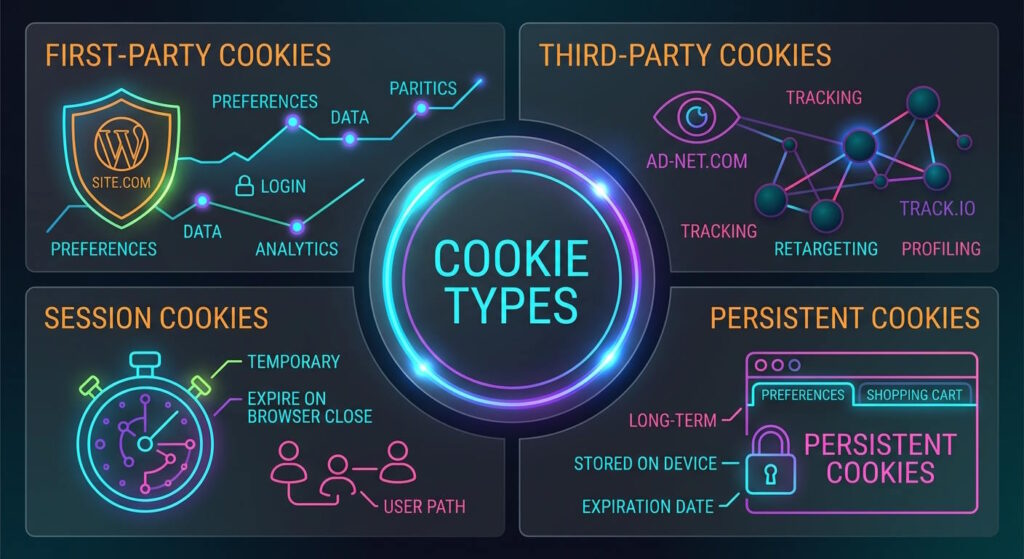
Cookies can be differentiated in various ways. Some descriptions can tell you where a cookie comes from, while others explain how long it stays on your device.
First-Party Cookies
First-party cookies are created directly by the website you’re visiting.
Usually, that means enabling features that make the website easier to use, such as remembering your login details, language, or other preferences.
For example, if you select English as your preferred language, and the website remembers that choice when you return, a first-party cookie is probably responsible.
Third-Party Cookies
Third-party cookies come from a domain other than the website you’re currently visiting, usually because they are linked to the ads displayed on that page.
They’re commonly associated with advertising, measuring website activity, and cross-site tracking.
By recognizing your browser across different websites, they can collect information about your browsing habits and interests. That data can be used for analytics or to show you more relevant ads.
Session Cookies
Session cookies are temporary and last only during your active browser session.
They’re commonly used to save your shopping cart as you browse, or remember your navigation through the website, such as which page to return to when you click the “back” button.
Persistent Cookies
Unlike session cookies, persistent cookies remain on your device even after you close your browser.
They have a set expiration period, ranging from a few days to several years, which defines how long they are stored.
Usually, they help keep you logged in so you don’t have to enter passwords every time you visit a website.
Additionally, they can track your browsing preferences over time and use them to personalize your experience.
Are Cookies a Privacy Risk?
Cookies themselves aren’t inherently dangerous. Many of them simply help websites function properly or make browsing more convenient.
The privacy concerns come from how certain cookies monitor your activity and what that data is used for.
Tracking cookies, particularly third-party ones, can collect information about your activity across different websites.
Over time, this tracking can reveal patterns in your browsing habits, including the websites you visit, products you’re interested in, and content you interact with.
The information can be used for purposes such as analytics, personalization, or targeted advertising. This is similar to how your internet service provider tracks your browsing history to sell it to the highest bidder.
Essentially, while cookies themselves aren’t harmful, the amount of data some of them gather means you could be sharing more about your online activity than you realize.
What’s Behind Cookie Consent Banners?
If cookies have existed for decades, you may be wondering why websites now constantly ask you whether you want to accept them.
The answer largely comes down to privacy laws and regulations. In places such as the EU and UK, websites need to get your consent before using non-essential cookies that track your activity.
These rules also require websites to explain why they use these cookies—for advertising, analytics, or another purpose—and give you a choice over whether to allow them.
That’s why cookie banners often let you accept all cookies, reject optional ones, or choose which categories you’re comfortable with.
However, essential cookies are treated differently. Since they’re necessary for basic website functions, they generally don’t require the same type of consent.
Should You Accept or Reject Cookies?
Being selective about the cookies you accept is usually the best approach.
Essential cookies are necessary for basic website functions, so accepting them generally has little impact on your privacy. Without them, parts of the website may not work properly or be available at all.
When it comes to optional cookies, it’s worth considering what they are used for.
For example, analytics cookies help website owners understand how visitors use their site and identify areas of improvement.
On the other hand, advertising and tracking cookies can track your activity and deliver targeted ads. If you’d rather limit that tracking, rejecting these cookies is the safer choice.
Can You Avoid Cookies Altogether?
You can block all cookies through your browser, although doing so may limit the functionality of certain websites.
Private browsing can also limit how long cookies stay on your device. Websites can still use them while you browse, but they’re generally removed once you close the window.
Choosing a browser with stronger privacy features can help limit online tracking even further.
For additional privacy, you can also use a VPN to hide your real IP address. Cookies can still collect information about your browsing activity, but websites won’t be able to associate it with your real IP address.
How to Manage and Delete Website Cookies
Even after you’ve accepted cookies, you still have control over what stays in your browser.
Most browsers allow you to manage cookies directly through privacy or security settings. Depending on the browser you use, you can usually:
- View cookies and other site data
- Delete cookies from specific websites
- Clear all stored cookies
- Block or limit third-party cookies
- Choose which websites are allowed to use cookies.
Deleting cookies removes the information stored in your browser, which means websites may no longer recognize you or remember your previous choices.
As a result, you could be logged out of accounts, lose saved preferences, or find that items have disappeared from your shopping carts.
Regularly reviewing these settings helps you keep unnecessary cookies from building up and leaves you in charge of what information websites can store about you.
Conclusion
Website cookies are a standard part of browsing the web, helping websites provide a smoother and more convenient experience.
While some cookies are just as important for websites to function as reliable hosting, others collect data for analytics, advertising, or tracking.
Understanding the difference helps you decide which ones to accept and which you’d rather opt out of.
After all, the right cookies can make your browsing easier without sacrificing your privacy.
Author
Monica Jansen
Monica Jansen is a seasoned tech writer focused on web hosting and cybersecurity. She loves doing deep dives and whittling down difficult topics into simple and succinct concepts. Whether she is covering firewalls or different hosting plans, she always strives to provide clear guides that website owners of all skill levels can follow.
Add your comment
Get content delivered straight to your inbox



Your data.
Your choice.
Work with the best of the best — your projects deserve it.